Exposing a public HTTPS endpoint and handling payload responses requires systematic implementation. Connecting system callbacks allows your app to capture customer events instantly. Follow this step-by-step developer setup guide.
Nov 15, 2025 11 min read By Waplix Team
Share:
Deploy production-ready WhatsApp webhooks with Waplix
Connecting your app to WhatsApp goes beyond sending message payloads. A reliable integration must respond to incoming customer messages, process interactive quick-replies, and log delivery statuses in real-time. Webhooks make this event-driven flow possible by pushing updates directly to your servers.
Setting up your webhook endpoint requires configuring a public HTTPS listener, implementing a GET verification handshake, parsing POST payloads, and validating message authenticity. Without these elements, your system may experience timeouts, duplicate message calls, or security vulnerabilities.
This step-by-step guide explains how to build a webhook listener, test it locally, deploy it to production, and secure it against unauthorized requests.
Overview: Webhooks let your server process events like incoming messages and status logs instantly, removing the latency of polling models.
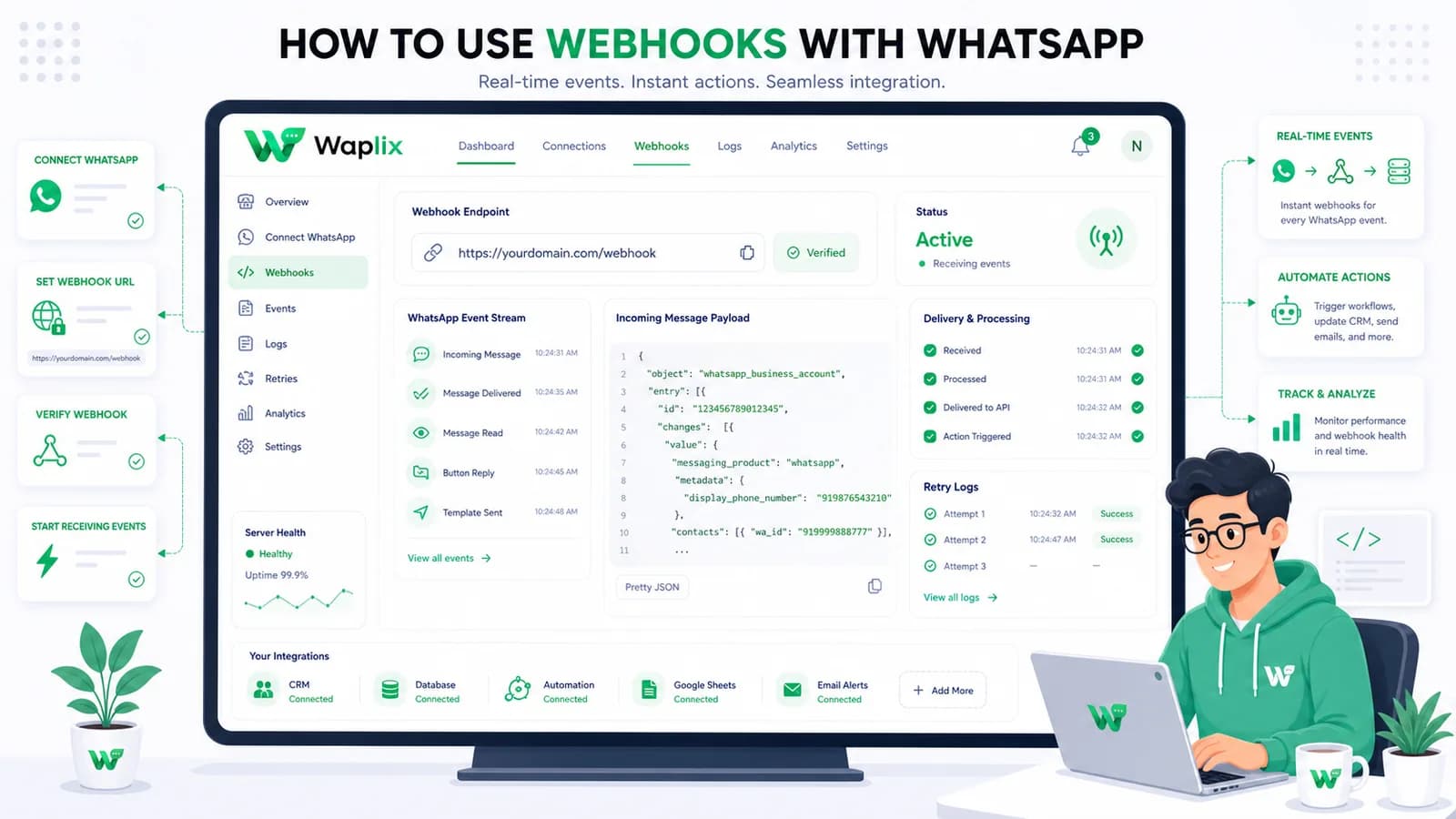
Receive pre-parsed JSON payloads, configure retry logic, and inspect webhook logs from our developer dashboard.
A webhook is a user-defined HTTP callback. When an event occurs—such as a user sending an image, a message status changing to "read", or a delivery failing—the API provider sends an HTTP POST request containing a JSON payload to your registered listener URL.
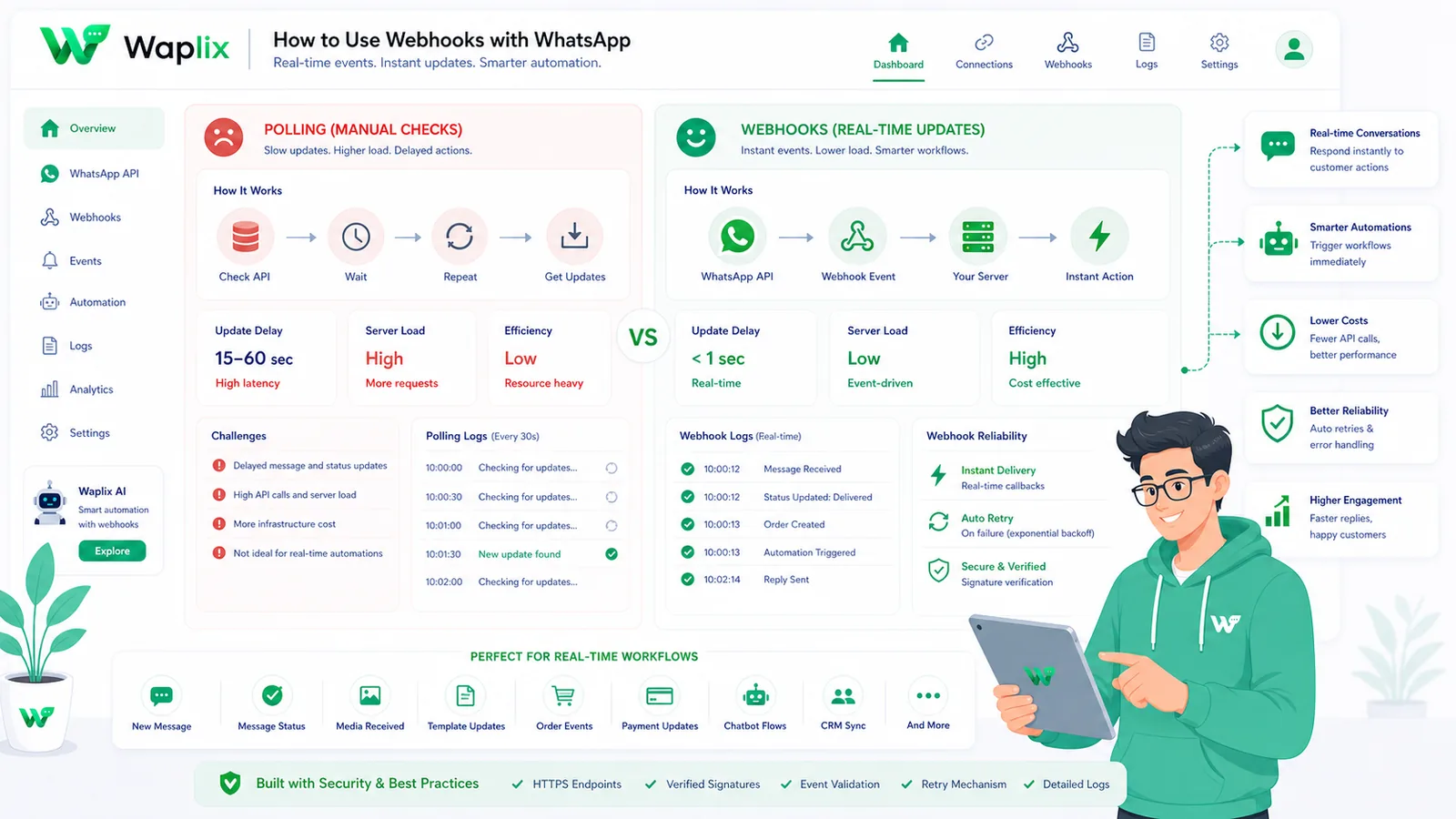
This pattern shifts your app architecture from a polling model to a push model, conserving resources and ensuring near-zero latency for incoming responses.
Integration Step
Manual Polling Route
Webhooks Ingress Route
Developer Advantage
Endpoint Requirements
None. Runs outbound client tasks only.
Requires public HTTPS endpoint listener.
Enables inbound interactivity
Validation Protocol
Simple authentication token in header.
GET handshake verification query parse.
Secures connection endpoints
Payload Formats
Flat GET response schemas.
Nested JSON event objects.
Provides detailed event context
Server Load
Continuous connection overhead.
Event-driven, temporary connections.
Optimizes infrastructure usage
By connecting systems, you can trigger specific messages based on customer behavior—such as confirming a booking, following up on a delivery, or recovering an abandoned shopping cart.
Webhook callbacks reduce network overhead and latency compared to traditional API polling.
Core event types tracked via webhooks
Your webhook listener must inspect the event header to parse and route payloads to the correct handlers.
1. Inbound messages (`messages.receive`)
Fires when a customer sends a text, image, document, location, or contact card. Your application uses this event to capture input, trigger AI responses, or route chats to agent queues.
2. Message status updates (`messages.status`)
Tracks the lifecycle of outbound messages. Events update status values from `sent` to `delivered`, `read`, or `failed` in real-time, providing visibility into customer engagement.
3. Template quality changes
Meta monitors template rejection and block rates. Webhook alerts notify your team if a template's quality rating drops, helping you adjust content before blocks occur.
4. Account billing events
Alerts notify you when your conversation quota limits are reached or card transactions fail, helping you maintain service continuity.
Key Takeaway
Process status updates (sent/delivered/read) asynchronously in a queue. High-volume delivery reports can bottleneck your main request loop if processed synchronously.
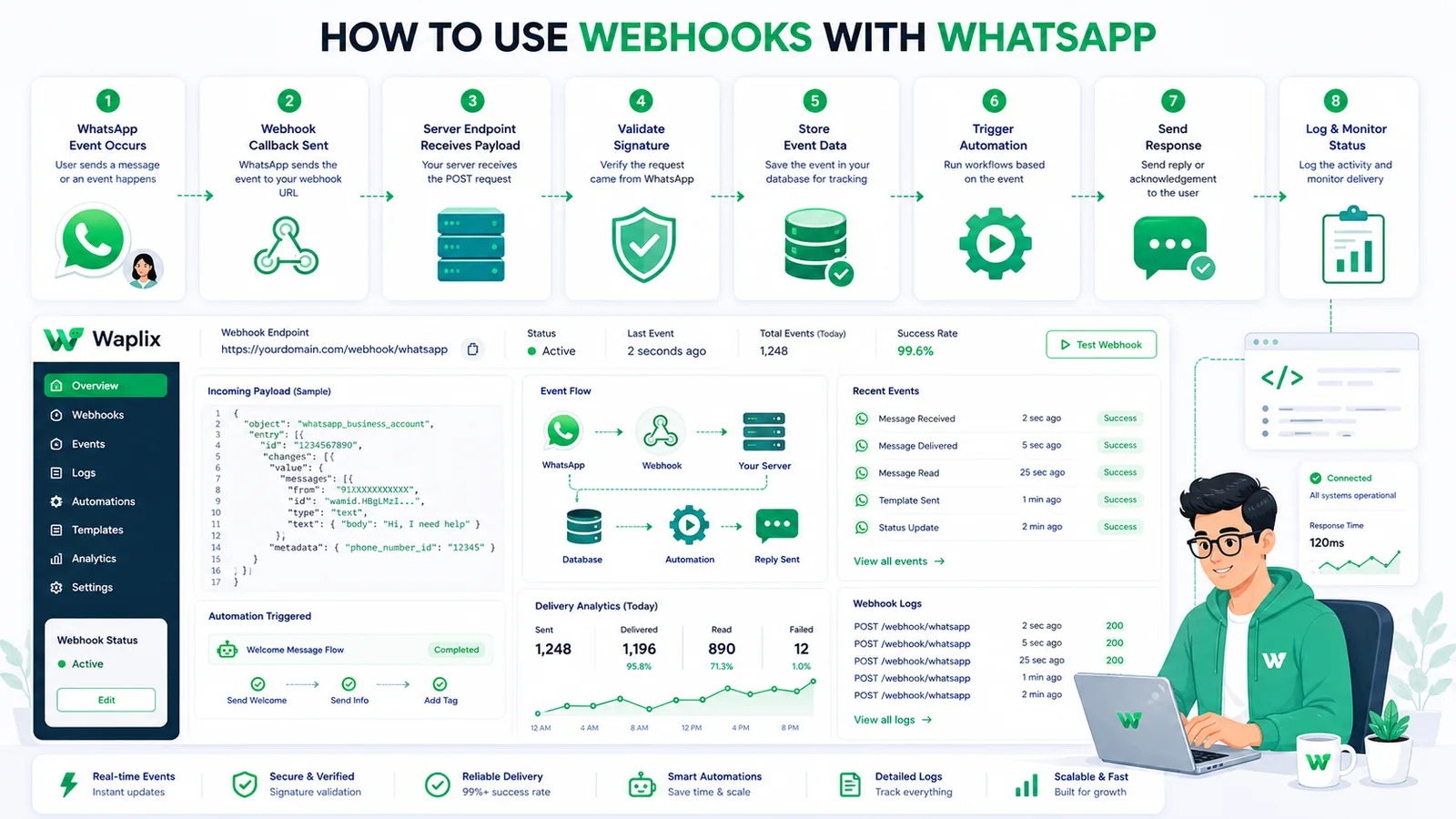
Step-by-step webhook implementation
Configuring a webhook listener requires setting up validation, parsing payloads, and handling retries. Follow this implementation guide.
01
Expose a public HTTPS URL
Set up an endpoint on your server. Use tools like local tunnels during development to expose your local port via HTTPS.
02
Implement the validation GET handshake
Write a GET endpoint to verify Meta's token verification challenge, returning the challenge string in plain text.
03
Handle inbound HTTP POST events
Configure a POST route to accept JSON payloads, return an immediate 200 OK, and hand off processing to a background worker.
04
Parse payload data
Extract fields like sender ID, message text, media file IDs, and delivery timestamps from incoming payloads.
05
Verify signature headers
Validate the SHA256 signature in the request headers against your webhook secret to confirm the payload's authenticity.
06
Manage retry logic
Ensure your listener returns a 200 OK within 3 seconds. Unresolved alerts will trigger automated retry loops from the gateway.
Developer Tip: Queue incoming webhooks instantly to a message broker (e.g. Redis, RabbitMQ) and acknowledge receipt with a 200 OK immediately. Do not perform long-running processes inside the webhook thread.
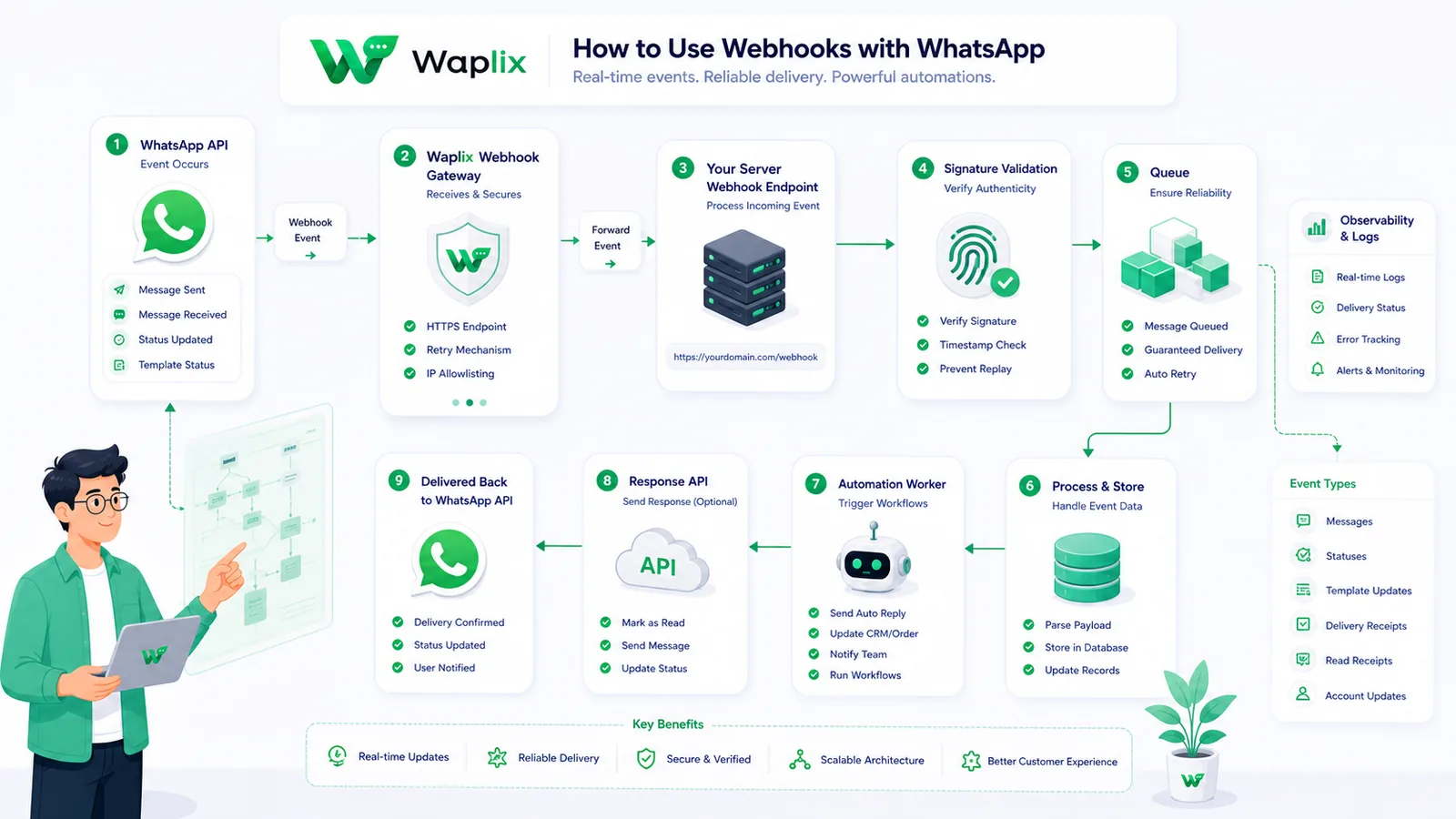
Webhook event ingestion pipeline
A robust listener separates webhook ingestion from payload processing. This diagram outlines the workflow from event trigger to application database updates.
Queueing incoming webhooks ensures your system handles traffic spikes during large broadcast campaigns without dropouts.
Events trigger callbacks from Meta. The listener validates the header signatures, queues the payload in Redis, and returns an immediate response. Background workers then process the data, handle database updates, and update CRM records.
Technical data flow and architecture
Real-time updates require clean sync between Meta servers, the Waplix gateway, and your backend databases.
The gateway parses raw Meta callbacks, validates signatures, and sends clean JSON payloads to your webhook URL.
When an event occurs, Meta triggers the Waplix backend. Waplix processes the payload, maps fields to standard structures, signs the headers, and sends the payload to your registered listener URL.
Developer Integration: Node.js and Python webhook examples
These examples show how to configure webhook validation and parse incoming JSON payloads using common backend frameworks.
1. Node.js Express setup
Write an Express route that validates the handshake GET request and processes POST payloads.
Developer Security Note: Always store your API keys securely in your environment variables. Validate incoming webhook signatures server-side to ensure payloads originate from Waplix.
Operating a customer support desk on WhatsApp requires strict adherence to Meta's messaging policies and local data privacy laws.
Opt-in verification. Businesses must secure explicit consent before sending outbound transactional alerts or ticket updates to customers.
The 24-hour service window. Free-form messages can be sent within a 24-hour service window opened by a user's message. Messages sent outside this window must use pre-approved templates.
Opt-out controls. Include clear opt-out options (such as quick-reply buttons like "STOP") in your templates to make unsubscribing easy and protect your quality rating.
Follow local privacy laws. Ensure compliance with GDPR, TCPA, and other relevant regional regulations.
Compliance Note: This guide provides operational advice, not legal counsel. Regulations vary by country and region. Always consult qualified legal advisors to ensure your messaging strategies comply with local laws.
How Waplix simplifies webhook management
Meta's raw webhook architecture requires managing complex JSON arrays, parsing nested user profile objects, and handling signature verifications. Waplix parses Meta's payload structures and sends clear, simplified JSON events directly to your server.
Replace this with a real Waplix screenshot showing API logs, webhook payloads, HTTP status responses, and request headers.
Suggested screenshot: The Waplix webhook debugger console, showing real-time dispatch payloads and statuses.
Common integration mistakes
Synchronous processing. Running heavy backend tasks (e.g. database updates) inside the webhook thread leads to timeout failures.
Skipping signature checks. Neglecting validation allows unauthorized parties to send fake payloads to your endpoint.
Incorrect HTTP status codes. Returning 500 errors or non-200 responses for successfully parsed payloads triggers retry loops.
Neglecting idempotency. Not tracking message IDs can lead to duplicate entries if Meta retries delivery.
Ignoring failure webhooks. Not logging message delivery failures (like invalid numbers) makes tracking logs inaccurate.
Best practices for webhook listeners
Queue all payloads
Acknowledge receipt with an immediate 200 OK response and process payload contents asynchronously using a queue.
Verify headers
Validate the request signature against your endpoint's secret token to ensure the payload originates from a trusted provider.
Implement idempotency
Store incoming message IDs in a temporary cache (e.g. Redis) to filter duplicate event triggers.
Monitor delivery stats
Analyze callback durations, verify HTTP codes, and track timeout alerts to optimize server resources.
Conclusion and next steps
Webhooks are essential for building responsive, real-time messaging applications on WhatsApp. Designing secure, asynchronous listeners ensures your system handles traffic spikes reliably while keeping databases synchronized.
Expose a public HTTPS URL, implement signature checks, queue incoming payloads, and test your setup using local tunnels to build a secure integration foundation.
Build secure WhatsApp integrations with Waplix
Create a developer account, connect your business number, and automate customer support at scale.
Learn how to build AI-driven booking systems on WhatsApp, connecting calendar databases to conversational agents, automating updates, and reducing client no-shows.
Discover practical ways small businesses can leverage no-code AI automation on WhatsApp to manage customer conversations, qualify prospects, and coordinate bookings 24/7.
Explore the technology behind AI memory and context retention, learning how session databases personalization results in better, trust-filled client interactions.